



































• Skip to primary navigation
  • Skip to main content
  • Skip to footer

Onyx Graphics - RIP Software for wide-format print


dashicons-linkedin

dashicons-facebook-alt

dashicons-instagram

Downloads▼Reseller Portal▼
  • Products
  • Free Trials
  • Portal Home
  • Marketing
  • Launch Kits
  • Promotions
  • Style Guide
  • Sample Images
  • Demo update
en_US
en_US es_ES fr_FR zh_CN ja de_DE ko_KR pt_PT
A simple magnifying glass icon on a white background, commonly representing the search function, perfect for use in cutting or printing workflows with Onyx Graphics.
  • Products
        • Latest Version
        • ONYX 25
          Get the newest version
          of your RIP software

        • RIP Products
        • ONYX Thrive
          Scalable network RIP and workflow solution

          ONYX PosterShop
          Easy, powerful RIP with
          advanced color control

          ONYX RIPCenter
          Streamlined RIP with
          intuitive color tools

          ONYX Go
          Subscription RIP software

        • Business Solutions
        • ONYX Align
          Print shop management
          software

          ONYX Hub
          Analytics tracking system

        • Tools & Automations
        • ONYX Trufit
          Shape-based, smart
          nesting software

          ONYX Sync
          Complete software
          connectivity system

        • Support
        • ONYX Advantage
          Support and updates to
          protect your investment

        • ONYX Products

          Explore the ONYX Ecosystem, with all products working together to provide you with a fully supported print shop.

          Learn more

  • Applications
    • Sign & Graphics
    • DTF
    • Textile
    • Wrapping
    • Automation
    • Cutting
    • Color Management
    • Sustainability
  • Store
  • Get Training
    • Purchase Courses
    • ONYX Learning Zone
  • About Us
    • Company
    • Regional Teams
    • News
    • Find a Reseller
  • Resources
    • Compatibility
    • FAQ
    • Online Help
    • Manage Subscriptions
    • Payment Center
    • Contact Us
    • ONYX Quick Set Libraries
    • Updates and Patches
    • Products
    • Free Trial

October 31, 2022

Abstract geometric background with overlapping blue and navy diagonal shapes and lines, ideal for printing projects or use with Onyx Graphics software.

ONYX PosterShop

Full-Featured Print Workflow for Superior Output

Single Printer, Complete RIP Software

Home / ONYX PosterShop

Built on Adobe PDF Print Engine

Full-Featured RIP Software For Stunning

Wide-Format Prints

Print stunning wide-format prints with a full-featured print workstation and intuitive RIP software. Produce high-quality, consistent, color-managed prints that customers can’t wait to display.

Try 15 Days Free

ONYX posterShop logo featuring the word "posterShop" with two orange gear icons, highlighting Printing by Onyx Graphics, and "ONYX" in gray in the top left corner.

Simple, Intuitive Software

Deliver Faster with Advanced Automation

Manage From Start to Finish
High-Speed Automation
Advanced Color Tools
Automatic Nesting
Cut-Only Workflows
Minimize Waste

Manage From Start to Finish

Simplify your wide-format printing workflow with one powerful, easy-to-use solution.

  • Submit files to RIP
  • Color manage, edit, print, and cut
  • Use a single software to reduce errors and maximize efficiency

High-Speed Automation

Reduce manual steps with saved print settings and instant file processing.

  • Use QuickSets to instantly process your files
  • Apply pre-set print settings for color management and more

Advanced Color Tools

Achieve consistent brand color matching with the ONYX Color Engine, built for wide-format printing.

  • Integrate the PANTONE color library
  • Create custom Swatch Books
  • Use automatic spot color matching
  • Build ICC profiles with flexible options

Automatic Nesting

Save time and reduce waste with intelligent image arrangement tools.

  • Arrange images based on size and orientation
  • Maximize efficiency with minimal manual adjustments
  • Preview cut paths easily before printing

Cut-Only Workflows

Speed up production by sending jobs directly to your cutter when printing isn’t needed.

  • Eliminate unnecessary print steps
  • Combine with smart nesting for material savings
  • Preview cut paths easily before cutting

Minimize Waste

Optimize every job with tools that reduce material and ink waste without sacrificing quality.

  • Precisely place jobs to use media efficiently
  • Accurately match colors to avoid reprints
  • Get the most out of every roll with smart ink and media usage

Compatible with 2000+ Wide-Format Printers and Cutters

Canon logo in bold red letters on a white background, ideal for use with RIP Software like Onyx Graphics for precise cutting and printing applications.
Epson logo in bold blue letters on a white background, often seen alongside RIP software like Onyx Graphics for precise cutting and print solutions.
The image shows the HP logo with lowercase "hp" letters in white inside a blue circle, often associated with cutting and printing solutions powered by Onyx Graphics.
Mimaki logo featuring the brand name in bold red lowercase letters on a white background, representing excellence in printing and compatibility with RIP software like Onyx Graphics.
Roland Digital Group logo featuring a black rectangle and lines next to the brand name in bold text, representing excellence in printing and cutting solutions.
ZÜND logo with bold blue text and a red arrow, accompanied by the words "swiss printing and cutting" below in light blue, highlighting advanced Cutting solutions compatible with leading RIP Software.
X-Rite logo with a stylized blue triangle on the "X" and bold black text spelling "Rite" on a white background, ideal for printing and cutting workflows used with Onyx Graphics.
The DigiTech logo with blue text on a white background, ideal for printing projects or integration with Onyx Graphics RIP Software.
Logo for Digital Graphics Incorporation featuring large black "DGI" letters, inspired by Onyx Graphics. Two small orange squares—one inside the "G," another between "G" and "I." Company name appears below, reflecting expertise in RIP Software and cutting solutions.
Logo for "HandTop USA" with "HandTop" in bold black letters, a red circle forming the "o," and "usa" in light gray lowercase letters to the right—perfect for printing and RIP Software branding.
The image shows the word "GRAPHTEC" in bold, blue, uppercase letters on a white background, often associated with Onyx Graphics and advanced printing solutions.
The word "grando" in blue lowercase letters; the letters "d" and "o" are connected with an infinity symbol design, reflecting innovation in cutting and printing inspired by Onyx Graphics.
The Fujifilm logo features a red icon with stylized "FUJI" text next to bold, black "FUJIFILM" lettering on a white background, representing innovation in printing and visual technology.
Kongsberg Precision Cutting Systems logo features the word "Kongsberg" in large letters, with "Precision Cutting Systems" below in smaller text, highlighting its expertise in Cutting and compatibility with Onyx Graphics RIP Software.
The image shows the logo "JWEI" with the letter "J" in orange and the rest in black, featuring a black underline below "WEI," highlighting its connection to cutting technology and RIP software like Onyx Graphics.
Black text logo reads "nix Color Sensor" on a white background, making it perfect for integration with cutting solutions or RIP software like Onyx Graphics.
The d.gen logo featuring four petal-shaped segments in yellow, blue, red, and black symbolizes innovation in printing, displayed to the left of the "d.gen" text in lowercase letters.

The VUTEk logo in red uppercase letters with a black swoosh underneath and a trademark symbol above the letter "K," often seen in Printing and Cutting solutions from brands like Onyx Graphics.
The image shows the Ricoh logo in bold red uppercase letters on a white background, representing innovation in printing and cutting solutions.
The image displays the MUTOH logo in bold, blue uppercase letters on a white background, highlighting its association with RIP Software for professional printing and cutting solutions.
The image shows the EFI logo in blue lowercase letters on a white background, representing a leader in printing and RIP software solutions.
The image shows the word "durst" in a rounded, sans-serif black font on a white background, evoking themes of printing and cutting in modern graphic design.
AGFA logo with bold black "AGFA" text and an orange diamond shape containing the word "Agfa" in white script, highlighting its legacy in printing and cutting technology.
The image shows the Brother logo with the brand name "brother" in bold, black lowercase letters on a white background, often associated with cutting-edge solutions like Onyx Graphics and advanced RIP Software.
ColorJet logo with tagline "India's largest manufacturer of Digital Inkjet Printers" on a white background, highlighting expertise in Printing and advanced RIP Software like Onyx Graphics.
Docan Digital Printing System logo with an orange swoosh and star above "Docan," highlighting advanced printing and cutting. The tagline is written below in black text.
InkTec logo in bold blue letters with horizontal lines cutting through the upper part of the text, set against a light gray background—perfect for showcasing advanced printing or cutting solutions.
The word "dimi" in lowercase letters, with the letters "i," "m," and "i" each represented by vertical bars in blue, pink, and orange colors—perfect for showcasing Onyx Graphics’ cutting-edge printing solutions.
DLican logo featuring a blue triangle design on the left and "DLICAN" beside it, inspired by Onyx Graphics and RIP Software, with the tagline "COLOR YOUR WORLD" underneath.
The swissQprint logo features the brand name in lowercase black letters with a red "Q" in the center, set against a white background—perfect for professionals using Onyx Graphics or advanced RIP Software for precision printing and cutting.
Logo with the word "MEHTA" in blue capital letters, featuring a red curved swoosh and a small checkered arrow below the letter "A," ideal for Printing businesses or those seeking advanced solutions like RIP Software from Onyx Graphics.
The word "FLORA" in green capital letters with an image of a sunflower replacing the letter "O" on a white background, perfect for cutting or printing with RIP software.
The word "JETRIX" in bold blue letters, with the letter "X" featuring a yellow-to-green gradient, highlights advanced features like cutting and seamless integration with RIP software such as Onyx Graphics.

Print Accurate Colors & Consistent Quality

Three stacks of coins with three upward arrows above them, suggesting financial growth or increasing profits—ideal for illustrating how Onyx Graphics RIP Software can boost efficiency and streamline cutting processes.

Powerful Adobe
RIP Processor

Capture every detail,
spot of color, gradient,
and transparency with the
Adobe PDF RIP Engine.

Blue outline icon of a color wheel with a dropper tool placed over it, representing color selection or color picking used in Onyx Graphics RIP Software for precise cutting and printing tasks.

Precise Color
Matching

Accurately color match with
optimized out-of-the-box
presets for color management,
ICC profiling, and Swatch Books.

Blue gear outline with a check mark inside, symbolizing settings, confirmation, or system approval—ideal for representing Onyx Graphics RIP Software features like automated cutting—on a light gray background.

Color-Manage
Nested Previews

Before you print, preview
true-to-print colors across full
nested layouts —saving time,
media, and rework.

Go The Extra Mile With
Print Finishing Tools

Save valuable time and control every last detail with automated print finishing tools:

  • Crop, rotate, scale, and color correct images with Job Editor.
  • Auto-add tiles, bleed, grommets & sewing marks.
  • Auto-generate registration marks.
  • Auto-nest print-and-cut files.
  • Preview cut paths before production.

Free Trial

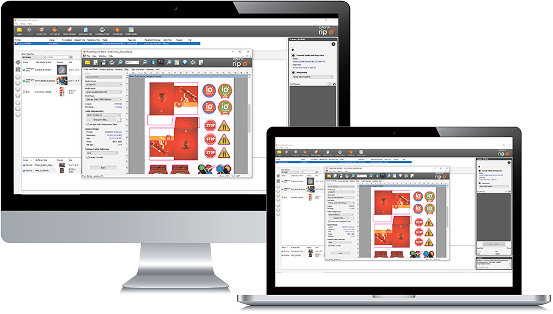
Two computer screens display the same RIP Software interface with various icons and images arranged on a workspace, streamlining processes like printing and cutting.

Features by Plan

PosterShop
One Adobe RIP Processors
One Job Editor
One Printer permission
ICC Profiling
DeviceLink+
QuickSets 2.0
GCR + ink savings
Swatch Book 2.0
Job tickets
Specialty ink support
Bleed and Grommets
Sewing marks
Level 1-2 printer support
Free Trial
ONYX Thrive
Four Adobe RIP Processors
Two Printer permissions
Two Job Editor
ICC Profiling
DeviceLink+
QuickSets 2.0
GCR + ink savings
Swatch Book 2.0
Job tickets
Specialty ink support
Bleed and Grommets
Sewing marks
Level 1-2 printer support
Level 3 printer support
Integrated G7 verification
Step and Repeat
Network license
AccuBoost
Access to ColorCheck
Access to ONYX Hub
Flatbed cutting option
Learn More

Customer
Success Stories

Logo for Louisiana Graphics featuring a black and white printing press graphic next to the words "Louisiana Graphics" in red script font, highlighting expertise in printing and professional cutting services.

“It (ONYX) was just very intuitive—and when I did run into problems, the customer service was so on point, always getting me where I needed to go. The ease of use, plus the support when we hit snags—whatever we got ourselves into, y’all got us out of it.”

Jason, Owner of Louisiana Graphics,

A man in a white shirt and hat sits at a wooden desk with microphones, in front of a backdrop featuring Hurdat and Hail Varsity logos, discussing topics like cutting-edge RIP software from Onyx Graphics.

“For both me and the company, it’s really about the friendly usability—it’s super easy to work with and navigate. Everything is clear and direct. Onyx has also rolled out new updates to stay current with Pantones, swatches, and similar tools, making it incredibly easy to save a spot, apply color codes, and essentially foolproof any print job before I even hit print.”

Tyler, Graphic Director Printing + Fabric at Install Nation,
ONYX Align and Wisconsin Wraps logos with text: "Wrapped in success," "Using ONYX Align by Onyx Graphics," and "Printing & Cutting Signs & Vehicle Graphics" on a blue and white background.

“Align has helped me. I mainly do vehicle graphics and wraps… when someone calls, they just want a quick quote. I can go in, pick the vehicle, make, model, year—and give ’em a price for a full wrap, partial wrap, or spot graphics almost instantly.”

“Get off the fence. Honestly, it saves so much time and it’s made me so much more money. Knowing your numbers—you’re not guessing anymore. You know exactly what you need, and you can adjust it on the fly.”

Josh, Owner of Wisconsin Wraps,

Get ONYX PosterShop

To learn more about ONYX PosterShop, simply fill out the form
below and an ONYX Representative will contact you to discuss
your business needs.

(If you are looking for a Trial of ONYX PosterShop, please use
one of the self-service links above).

Four parallel white diagonal lines on a light gray background evoke precision, reminiscent of cutting or printing paths in RIP software workflows.

Have questions or want
to learn more?

Contact Us

Onyx Graphics logo featuring three diagonal blue lines to the left of the word "ONYX" in light gray text on a light background, representing expertise in printing and RIP software solutions.

Onyx Graphics, Inc.
6915 South High Tech Drive,
Salt Lake City, UT 84047

+1 801.568.9900
sales@onyxgfx.com

Reseller Portal
Privacy Policy
Terms of Use
Limited Warranty

Web Accessibility
ISL
Payment Center
Contact Us


dashicons-linkedin

dashicons-facebook-alt

dashicons-instagram

This site is protected by reCAPTCHA and the Google Privacy Policy and Terms of Service apply

© 2025 Onyx Graphics, Inc. All rights reserved. Designed by TinyFrog Technologies.

We use cookies on our website to give you the most relevant experience by remembering your preferences and repeat visits. By clicking “Accept”, you consent to the use of ALL the cookies.
Do not sell my personal information.
Cookie SettingsAccept
Manage consent

Privacy Overview

This website uses cookies to improve your experience while you navigate through the website. Out of these, the cookies that are categorized as necessary are stored on your browser as they are essential for the working of basic functionalities of the website. We also use third-party cookies that help us analyze and understand how you use this website. These cookies will be stored in your browser only with your consent. You also have the option to opt-out of these cookies. But opting out of some of these cookies may affect your browsing experience.
Necessary
Always Enabled
Necessary cookies are absolutely essential for the website to function properly. These cookies ensure basic functionalities and security features of the website, anonymously.
CookieDurationDescription
cookielawinfo-checkbox-analytics11 monthsThis cookie is set by GDPR Cookie Consent plugin. The cookie is used to store the user consent for the cookies in the category "Analytics".
cookielawinfo-checkbox-functional11 monthsThe cookie is set by GDPR cookie consent to record the user consent for the cookies in the category "Functional".
cookielawinfo-checkbox-necessary11 monthsThis cookie is set by GDPR Cookie Consent plugin. The cookies is used to store the user consent for the cookies in the category "Necessary".
cookielawinfo-checkbox-others11 monthsThis cookie is set by GDPR Cookie Consent plugin. The cookie is used to store the user consent for the cookies in the category "Other.
cookielawinfo-checkbox-performance11 monthsThis cookie is set by GDPR Cookie Consent plugin. The cookie is used to store the user consent for the cookies in the category "Performance".
viewed_cookie_policy11 monthsThe cookie is set by the GDPR Cookie Consent plugin and is used to store whether or not user has consented to the use of cookies. It does not store any personal data.
Functional
Functional cookies help to perform certain functionalities like sharing the content of the website on social media platforms, collect feedbacks, and other third-party features.
Performance
Performance cookies are used to understand and analyze the key performance indexes of the website which helps in delivering a better user experience for the visitors.
Analytics
Analytical cookies are used to understand how visitors interact with the website. These cookies help provide information on metrics the number of visitors, bounce rate, traffic source, etc.
Advertisement
Advertisement cookies are used to provide visitors with relevant ads and marketing campaigns. These cookies track visitors across websites and collect information to provide customized ads.
Others
Other uncategorized cookies are those that are being analyzed and have not been classified into a category as yet.
SAVE & ACCEPT

Purchasing Info Sync


Request a demo

To learn more about ONYX Align and how it can benefit your print business,
use the form below and an ONYX representative will
contact you to schedule a demo


Get ONYX RIPCenter

To request a trial or to purchase, simply fill out the form
and an ONYX representative will contact you
about your business needs.


Check our self-help resources for common product questions

ONYX SupportCenter


Fill out the form to let us know if you cannot find the manufacturer or device you are looking for.
