









When production is running, the last thing you need is downtime. Whether you’re troubleshooting an issue, looking for documentation, or submitting a support request, utilizing myONYX makes it easy to get the help and resources you need—fast.
Welcome to the ONYX SupportCenter, your centralized hub for technical documentation, software downloads, and customer assistance.
One Account. All Your ONYX Resources.
Everything starts with myONYX, the new SSO solution.
With a single myONYX account, you can access all ONYX support resources in one place. If you already have an account, simply log in. New to ONYX? Creating an account only takes a moment.
👉 Log in or create your account:
https://onyxgfx.us.auth0.com/login
To use the ONYX Support Center, you must be logged in with a myONYX account.
What You Can Do in the ONYX SupportCenter
Once logged in, the Support Center gives you access to a wide range of tools and resources designed to keep your workflow moving:
- Technical documentation and knowledge articles
- The ONYX Product Community for peer-to-peer knowledge sharing
- Support request submission and ticket tracking
How Onyx Support Works
In most cases, ONYX resellers and Manufacturing partners provide first-level technical support for ONYX products. Depending on your active subscription or support agreement, you may also be eligible for direct support from the Onyx team.
Please note:
- You must be using the current or previous ONYX product version to qualify for support.
- Access to ticket submission, response times, and priority handling depends on your support plan.
- All customers can access ONYX’s online knowledge resources at any time.
Technical Documentation & Help Center
The ONYX SupportCenter is more than a ticketing system—it’s a continuously updated knowledge base built to support real-world production environments.
Inside, you’ll find:
- Product documentation
- FAQs and troubleshooting articles
- How-to guides and workflow tips
- Best practices from the ONYX team
Some resources and all support requests require you to be logged in to view or submit.
Who Can Access Onyx Support?
Anyone with a myONYX account can access the SupportCenter and technical documentation.
Eligibility for direct technical support, response times, and priority handling varies based on your active subscription or support agreement.
Support for Subscription-Based Products
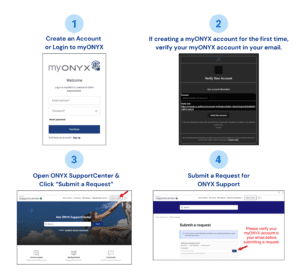
If you have an active ONYX subscription, you can submit support requests directly through the Support Center.
How to contact support:
- Log in with your myONYX account
- Open the ONYX SupportCenter
- Select Submit a request and complete the form
- Watch your verified email for a response from the Onyx Support Team
All requests are handled according to your support eligibility.
Support for Perpetual Licenses
For customers using perpetual licenses:
- An active support or maintenance agreement is required for technical support
- Customers with a valid agreement can submit requests through the SupportCenter
- Customers without an active agreement should contact Onyx Sales to review available options
Keep Your Production Running
ONYX support and maintenance programs are designed to reduce downtime and keep your workflows moving efficiently.
Depending on your plan, benefits may include:
- Access to software updates and enhancements
- Technical assistance from the Onyx team
- Training and self-service resources
- Prioritized support tickets
Need Help Choosing the Right Option?
If you didn’t find the answer you were looking for, our Sales team is happy to help you review support options or select the right solution for your busines
