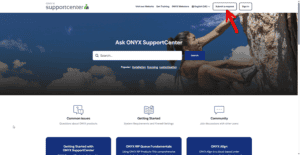
TheONYX 지원센터is your central hub for support, knowledge base articles, and helpful resources. Use it to submitsupport requests,bug reports, andfeature requests, and to track your ticket history.
NOTE: If you have previously created a user in the previous version of myONYX, you will need to create a new account. This is required for new security measures we have put in place. If you select “Forgot Password” and you do not receive an email, you currently do not have an account in the new myONYX.
Account Setup
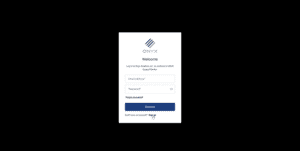
In your preferred web browser, navigate to:https://support.onyxgfx.com and select Sign Up at the bottom of the Welcome page.
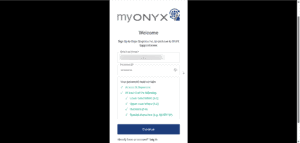
Fill in the required fields including:
Email Address
Desired password
Select “Continue”
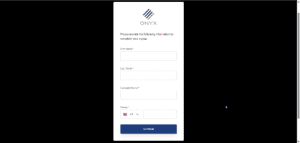
Enter the required fields including
Your First Name
Your Last Name
Your Company Name
Your Phone Number
Select “Continue”
Once you have completed your registration, you’ll return to theONYX 지원센터. If your are not automatically signed in to SupportCenter, please sign in.
NOTE: You will receive an email after your registration to verify your new myONYX account. It is very important to verify your registered email. Failure to do so will not allow for technical support to respond to your requests. This is part of our new security measures to ensure that your account is safe.
Submit a Request
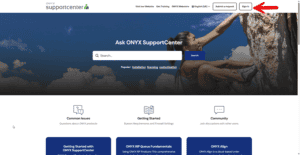
To submit asupport request,bug report, orfeature request, selectSubmit a requestin the top-right corner of the SupportCenter.
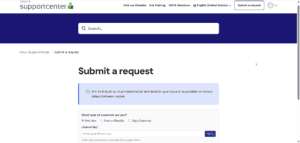
SelectSubmit a request.
Choose the appropriate request type.
Fill out the form with as much detail as possible, then submit.
CC option:You can Carbon Copy (CC) additional email addresses on a submission. This is helpful for리셀러who want to includeend usersin ticket updates.
View and Manage Your Requests
After submitting a ticket, you can view your ticket history and manage open requests from your account menu.
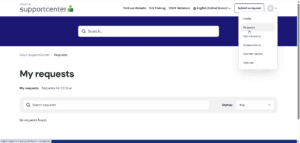
Open the account drop-down menu (top-right).
SelectRequests.
View the status and contents of any previously submitted tickets.
FromRequests, you can review ticket status, read prior updates, and respond to keep work moving.
당사는 웹사이트에서 쿠키를 사용하여 사용자의 선호도와 반복 방문을 기억함으로써 가장 관련성 높은 경험을 제공합니다. "동의"를 클릭하면 모든 쿠키 사용에 동의하는 것입니다.
이 웹사이트는 사용자가 웹사이트를 탐색하는 동안 사용자 경험을 개선하기 위해 쿠키를 사용합니다. 이 중 필요한 것으로 분류된 쿠키는 웹사이트의 기본 기능 작동에 필수적이므로 귀하의 브라우저에 저장됩니다. 또한 당사는 귀하의 웹사이트 사용 방식을 분석하고 이해하는 데 도움이 되는 제3자 쿠키를 사용합니다. 이러한 쿠키는 귀하의 동의가 있는 경우에만 귀하의 브라우저에 저장됩니다. 또한 이러한 쿠키를 거부할 수 있는 옵션이 있습니다. 그러나 이러한 쿠키 중 일부를 선택 해제하면 브라우징 환경에 영향을 미칠 수 있습니다.